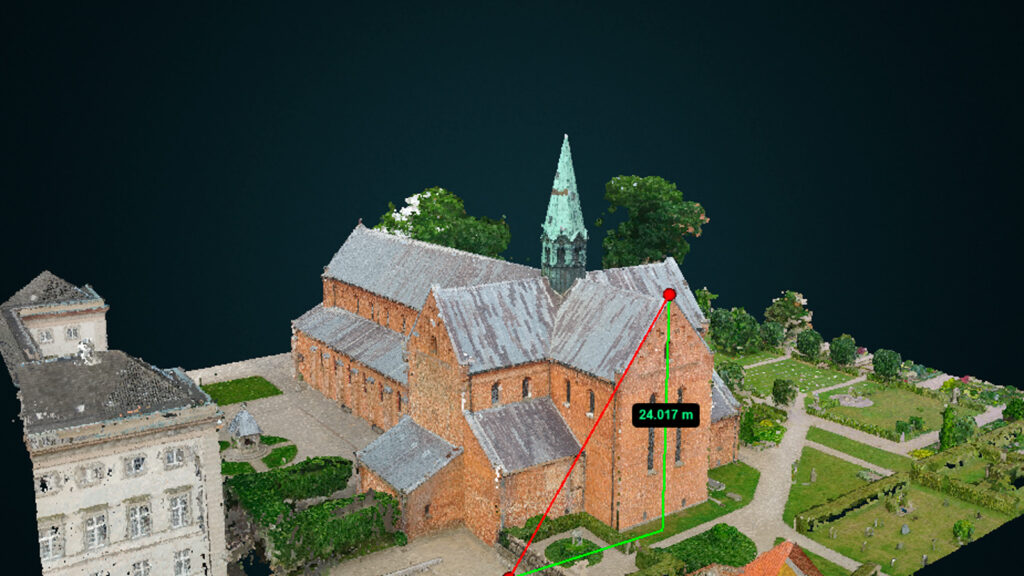
I en tid hvor unøjagtige ledningsdata plager forsyningssektoren, træder Reality Capture, AI og objektgenkendelse ind som potentielle redningsmænd. Vi udforsker, hvordan disse teknologier ikke kun kan forbedre dataindsamling og dokumentation af underjordisk infrastruktur, men også bidrage til at reducere graveskader. Fra skabelsen af fotorealistiske 3D-modeller til automatiseret genkendelse af objekter i anlægsgrave, ser vi på, hvordan denne teknologiske triade kan revolutionere præcisionen og effektiviteten af vores underjordiske netværk. Er dette vejen frem mod en mere sikker og effektiv infrastruktur?
Vil du læse hele indlægget? Så kan du gøre det lige her på vores vidensbase. Klik på storskræm ikonet for at læse artiklen i fuld størrelse. Du kan også klikke på linket nedenunder. Husk det er side 12 – 13.
This is the list of topics planned for next release
Expected release: May 2024
New functionalities and features
Short description of the new functionalities and features
Showing progress status for waiting tasks
Download of orthophoto and DEM from Dashboard
Bug fixes and minor improvements
List of notable bug fixes, minor yet significant improvements, and corrections
Fixed download-button for images
PointView 7.2 – Planned release
This is the list of topics planned for next release
Expected release: April 2024
New functionalities and features
Short description of the new functionalities and features
Implemented classification for SmartSurvey Point Clouds
Processing of orthofotomosaics from old Point Clouds
Showing progress status for waiting tasks
Download of orthophotos
Record on data-tab for pointclouds uploaded through dashboard
Bug fixes and minor improvements
List of notable bug fixes, minor yet significant improvements, and corrections
Fixed download-button for images
Fixed a lot of minor functionalities for digitalization
PointView 8.14.2 – Hotfix – 12/10-2026
The update is published and accessible to all users.
New functionalities and features
Short description of the new functionalities and features
Nothing released
Bug fixes and minor improvements
List of notable bug fixes, minor yet significant improvements, and corrections
Fixed incorrect area calculation with the polygon tool. (374298)
Updated the texts and layout of the reprocessing dialog. (383316)
PointView 8.14.1 – Hotfix – 07/10-2026
The update is published and accessible to all users.
New functionalities and features
Short description of the new functionalities and features
Nothing released
Bug fixes and minor improvements
List of notable bug fixes, minor yet significant improvements, and corrections
Security & access
Hardened access control for restricted projects and approved users. (381436)
Fixed an issue where direct project links refused users with shared access to the project. (381435)
Dashboard & UI
Fixed an issue where projects could not be shared because an expiry date next year could not be selected. (383271)
Fixed sorting by average model accuracy. (382046)
Fixed an issue where new users could not be created in User Management. (381167)
Point clouds & data
Fixed an error in the info tool for point clouds with non-standard dates. (381319)
PointView 8.14 – 21/09-2026
The update is published and accessible to all users.
This release adds new upload options, brings back reprocessing for datasets, and includes a range of fixes across Dashboard, access control, media handling and point cloud workflows.
New functionalities and features
Short description of the new functionalities and features
Users can now upload orthophotos directly from the Dashboard. (341281)
Users can now upload point clouds as LAZ files. (376974)
Added support for panorama upload from XGrid scanners. (324460)
Added support for panorama upload from Emesent scanners. (376608)
Users can once again start a reprocessing of a dataset from the Dashboard. (380530, 380955)
SmartSurvey point clouds can now be viewed as a 3D mesh. (349330)
User data is now shown in the 360/NavVis minimap. (377628)
Improved address search. (341562)
Improved handling of country-specific coordinate systems in SmartSurvey processing. (360203)
More accurate coverage polygons for SmartSurvey data. (374472)
Bug fixes and minor improvements
List of notable bug fixes, minor yet significant improvements, and corrections
Security & access
Fixed an issue where an existing customer-user relation was not found at login. (347582)
Fixed project expiration so it checks the customer’s main contract. (348962)
System administrators now have access to Buildings and Floors. (315228)
Faster login through a lighter customer lookup. (357050)
Dashboard & UI
Updated User Management. (361290)
Fixed the menu not showing the current page after login. (377214)
Fixed the cookie message that kept reappearing. (377135)
Fixed an error when showing the quicklink page. (375833)
Removed a faulty page from the navigation. (375825)
Hid unusable tabs in the Dashboard. (321855)
Fixed the email sent when a new project is created. (352582)
“Citizen” users are no longer listed as project contact email. (360418)
Fixed several issues with video processing and project links reported by customers. (344797)
Projects & navigation
Fixed issues when using project links from another customer. (321033)
Fixed direct view links from NavVis projects. (375480)
Fixed an issue where Edit Project did not load project metadata for NavVis projects. (322204)
Fixed opening PointView from the Revit integration. (350797)
Media, images & video
Fixed incorrect panorama display. (350589)
Fixed errors in image upload. (377077)
Fixed an issue where images could not be deleted in PointView projects. (364961)
Fixed an accuracy value being shown for videos without video data. (357074)
Updated the camera position icon in NavVis and Mobile Mapping projects. (321847)
Maps, orthophotos & point clouds
Fixed point cloud upload issues. (347086)
Fixed camera positions in terrestrial laser scanning projects. (321845)
Selecting multiple point clouds no longer shows every digitization item. (371113, 373882)
Fixed reprocessed drone datasets that still showed the old orthophoto and report. (364829)
Drone processing now recovers automatically when coordinate system information is missing on the first run. (363843)
Fixed duplicate point cloud entries after Pick-a-Point processing. (364926)
APIs & performance
Fixed incorrect timestamps in the PointView API. (339854)
Fixed duplicate loading of the 3D engine, so pages load faster. (323409)
Updated the SmartSurvey API to send video coordinates. (375255)
Upgraded the PointView store API to .NET 10 and added logging and audit trails to the APIs. (373565, 377538, 378259)
PointView 8.13 – 13/05-2026
The update is published and accessible to all users.
New functionalities and features
Short description of the new functionalities and features
Outdated versions of the SmartSurvey app are now blocked and must be updated before upload. (345628)
Bug fixes and minor improvements
List of notable bug fixes, minor yet significant improvements, and corrections
Fixed an issue where approving images only approved the images loaded in the table. (340399)
Fixed an issue where uploaded ZIP files were not always deleted after a point cloud upload. (342760)
PointView 8.12 – 3/5-2026
The update is published and accessible to all users.
This release includes a range of fixes and improvements across Dashboard, project navigation, Orthophoto, media handling, and point cloud workflows.
New functionalities and features
Short description of the new functionalities and features
Alternative and more intuitive display of point cloud coverage on the overview map. (326455)
Improved pagination, sorting, and filtering in the Image Dataset tab. (322048)
Faster loading in the Orthophoto tab. (321441)
Unified and improved data storage for all PV data (293140)
Bug fixes and minor improvements
List of notable bug fixes, minor yet significant improvements, and corrections
Security & access
Fixed an issue where dashboard links could sometimes work even if the user did not have correct access. (330415)
Fixed an issue where old browser state could carry across logins and customer sessions. (330405)
Dashboard & UI
Fixed image filtering in Dashboard. (331134)
Standardized the UI in the legend. (331624)
Fixed unusable tabs in Dashboard so they are hidden when not relevant. (321855)
Fixed issues in the Logs tab related to pipeline view and details. (332433, 320672)
Fixed an issue where the map view could not be minimized after being maximized. (321852)
Fixed an issue where MapView could be hidden below the Point Cloud menu. (321849)
Fixed an issue where a newly created project was not opened automatically. (330406)
Projects & navigation
Fixed issues when using project links. (321033)
Fixed an issue where Edit Project did not load project metadata for NavVis projects. (322204)
Media, images & video
Improved the dropdown list for moving videos to another project. (332989)
Fixed panoramic view issues in terrestrial laser scanning projects where the pano from the last project could be shown. (322130)
Fixed unused space in the Image tab in NavVis projects. (321856)
Maps, orthophotos & point clouds
Fixed cases where orthophoto did not appear correctly on first opening. (325864)
Fixed cases where the background map in Orthophoto tabs did not appear until refresh. (325827)
Fixed an issue where minimized or hidden point cloud windows reappeared in MM split view. (333420)
Fixed incorrect 3D representation of camera positions in drone projects. (321867)
Data & export
Fixed an issue where digitized line objects could not be deleted. (312626)
Fixed an issue where GeoJSON export files could become corrupt. (270122)
General improvements
Fixed issues in the Accuracy Dashboard. (326725)
Added missing English translation for Drone project type. (321862)
Improved number formatting in the Volume tool. (329955)
PointView 8.11 – 15/01-2026
The update is published and accessible to all users. This release replaces version 8.10, which was rolled back due to instability.
New functionalities and features
Short description of the new functionalities and features
Users can now experience a significantly faster PointView, following a major backend migration and API optimization.
Users can now download point clouds in reprojected coordinate systems directly from the Dashboard.
Users can now reliably view and manage images and videos across PointView, SmartSurvey, Mobile Mapping, and PointView360 projects after migration to the new media store.
Bug fixes and minor improvements
List of notable bug fixes, minor yet significant improvements, and corrections
Security
Fixed a critical security issue where panoramas could be viewed by users without proper access rights.
Dashboard & UI
Fixed spacing and layout issues in Dashboard tables and image grids.
Fixed sorting issues for recent measurements and dataset creation dates.
Fixed errors and red popup warnings when navigating between projects and tabs.
Fixed missing or malfunctioning buttons (upload, reprocessing, selection).
Fixed issues where images were not visible under the Image Dataset tab.
Fixed problems when opening projects via project links or WFS links.
Media, images & video
Fixed video upload issues and incorrect handling of SmartSurvey videos.
Fixed image ZIP upload, EXIF handling, and image editing after migration.
Fixed missing images in Pick-a-Point, Orthophoto tab crashes, and PointView360 media visibility.
Fixed missing videos and reports in the Data tab.
Point clouds & data
Fixed issues with E57 upload (including missing geometry).
Fixed TLS and Mobile Mapping data loading and visualization issues.
Fixed errors when opening point clouds from the Dashboard.
Fixed incorrect handling of compound CRS and JWT tokens.
Fixed download of point clouds in alternate coordinate systems (frontend and backend).
APIs & performance
Migrated all actively used APIs from the legacy Node backend to the C# PointView API.
Retired the Node backend.
Optimized SQL queries and API endpoints, including tiles, bounding boxes, media, and metadata.
Ensured all APIs consistently expose media URLs .
Reduced unnecessary calls to URM verification services.
PointView 8.10 – 19/12-2025
This release was rolled back due to severe instabilities
PointView 8.9 – 16/10-2025
The update is published and accessible to all users.
New functionalities and features
Short description of the new functionalities and features
Users can now upload multiple las-files at the same time
SmartSurvey data is now born with metadata from the new app
Bug fixes and minor improvements
List of notable bug fixes, minor yet significant improvements, and corrections
Fixed bug in adress search in map-view
Fixed bug in Mobile Mapping projects without panorama images
Fixed bug in image EXIF upload, display error message
Update and optimization of geometry in Mobile Mapping projects
Update and optimization of SmartSurvey API
Update and optimization of PointView API
PointView 8.8 – 30/09-2025
The update is published and accessible to all users.
New functionalities and features
Short description of the new functionalities and features
Users can now do multiple edits in project sharing list
Users can now download DEM for UAV daa from dashboard
Bug fixes and minor improvements
List of notable bug fixes, minor yet significant improvements, and corrections
Fixed bug in Upload multiple las files for Mobile Mapping
Fixed bug in PointView 360, fix selecting from projekt-list
Update and optimization of SmartSurvey API
Update and optimization of PointView API
Update and optimization of compress las-file to laz-file
Update and optimization of databses structure
Update and optimization of PointView 360 share functionality
Update and optimization of Image upload when no exif
Update and optimization of pagination on video tab
Update and optimization of automatic emails for PointView and SmartSurvey
Update and optimization of Left-side navigation bar
Update and optimization of Videoscan3D landing page
PointView 8.7 – 11/09-2025
The update is published and accessible to all users.
New functionalities and features
Short description of the new functionalities and features
Bug fixes and minor improvements
List of notable bug fixes, minor yet significant improvements, and corrections
Fixed bug in “settingsLinks”, they are not QuicviewLinks and have expiration
Fixed bug in PointView 360, control of bottom z-vzlue
Fixed bug in PointView when multiple tabs are open
Fixed bug in download of orthophotos
Fixed bug in PointView 360, Share on share-tab
Fixed bug in PointView 360, Quickview link
Fixed bug in PointView 360, Access to building and floors to SystemAdmins
Fixed bug in Localization for language change
Update and optimization of Videoscan3D background map
Update and optimization of calls to URM
Update and optimization of PointView API
Update and optimization of upload of images with exif info
Update and optimization of opening of Projects page
Update and optimization of orthofoto tab
PointView 8.6 – 28/08-2025
The update is published and accessible to all users.
New functionalities and features
Short description of the new functionalities and features
Compas in point cloud view
Users can now see Orthophotos in Dashboard
Users can now download Orthofoto from Dashboard
Users can now reproject Orthofoto during download directly from Dashboard
Bug fixes and minor improvements
List of notable bug fixes, minor yet significant improvements, and corrections
Fixed bug in Dashboard pagination in point cloud and logs tabs
Fixed bug in Upload Mobile Mapping data. Remove layer control
Fixed bug in Mobile Mapping, show map
Fixed bug in Mobile Mapping, minimap resize
Update and optimization of PointView 360 .csv dataupload
Update and optimization of Initial load of PointView overview map
Update and optimization of PointView API
Update and optimization when navigation between tabs
PointView 8.5 – 29/07-2025
The update is published and accessible to all users.
New functionalities and features
Short description of the new functionalities and features
Bug fixes and minor improvements
List of notable bug fixes, minor yet significant improvements, and corrections
Fixed bug in Reprocessing SmartSurvey data
Fixed bug in Image-Upload
Fixed bug in Overview Map Zoom to Extent
Update and optimization of LERGIS for PointView and HeyPipe
Update and optimization of Login-Authentication
Update and optimization of PointView API
Update and optimization of SmartSurvey API
PointView 8.4 – 17/07-2025
The update is published and accessible to all users.
New functionalities and features
Short description of the new functionalities and features
Users can now do reprocessing of SmartSurvey from the LOGS tab
Bug fixes and minor improvements
List of notable bug fixes, minor yet significant improvements, and corrections
Fixed bug in VideoScan3D
Fixed bug in “Zoom to Extent”
Fixed bug in icon for panoramaimages on overview map
Fixed bug in LERGIS for PointView
Fixed bug in upload data for HeyPipe
Fixed bug in direct-links in PointView
Fixed bug in Mobile Mapping viewer related to panoramas
Fixed bug in Mobile Mapping viewer when viewing more than one point cloud
Fixed bug in Project sharing
Fixed bug in Subcontractor can now upload data
Fixed bug in Delete Project
Update and optimization of VideoScan3D
Update and optimization of WMS-service
Update and optimization of PointView API
Update and optimization of SmartSurvey API
Update and optimization of JobManager API
Update and optimization of image filter in pick-a-point
PointView 8.3 – 26/06-2025
The update is published and accessible to all users.
New functionalities and features
Short description of the new functionalities and features
Import and export of dxf-files has been improved significantly
Bug fixes and minor improvements
List of notable bug fixes, minor yet significant improvements, and corrections
Fixed bug in VideoScan3D
Fixed bug in metadata handling for PointView 360 data
Fixed bug in Pick-a-Point functionality
Fixed bug in user authentication in specific situations
Fixed bug in the browser’s back arrow
Fixed bug in “Select Customer” dialog box
Fixed bug in Print functionality
Fixed bug in Project Sharing
Update and optimization of LOGS tab
Update and optimization of language handling
Update and optimization of VideoScan3D
Update and optimization of color coding related to accuracy classes for SmartSurvey data
Update and optimization of text in “Project Status”
Update and optimization of MapView display
Update and optimization of PointView APIs
PointView 8.2 – 10/06-2025
The update is published and accessible to all users.
New functionalities and features
Short description of the new functionalities and features
Implemented new feature in height measurement tool. Now all distances are shown.
Bug fixes and minor improvements
List of notable bug fixes, minor yet significant improvements, and corrections
Fixed bug to keep info-window open in 2D-profile
Fixed bug in Add User through User Management for Administrators
Fixed bug in authorization component
Fixed bug in Zoom to extent
Fixed bug in replace point cloud when using e57
Fixed bug in viewing images for SmartSurvey that could display nearby UAV images
Fixed bug in minimap, which could be dragged outside the viewing area when using multiple screens
Update and optimization of SmartSurvey data processing
Update and optimization of Change Customer functionality
Update and optimization of language file to contain Japanese
Update and optimization of internal processes in PointView
Update and optimization of frequency of dialog-popup-boxes
Update and optimization of API endpoints for new SmartSurvey app
PointView 8.1 – 26/05-2025
The update is published and accessible to all users.
New functionalities and features
Short description of the new functionalities and features
Implemented new design for digitalization with kodetable
Implemented new design for showing data information in Mapview for geometry
Bug fixes and minor improvements
List of notable bug fixes, minor yet significant improvements, and corrections
Fixed bug in sorting customer list alphabetically
Fixed bug in displaying Mobile Mapping data
Fixed bug in PointView 360 Floor Builder
Fixed bug in Zoom to extent
Fixed bug where point cloud freezes in Image Inspector when the sidebar is unfolded
Fixed bug in North Arrow in Point Cloud view
Update and optimization of SmartSurvey data processing
Update and optimization of digitalization from code table
Update and optimization of language file to include Japanese
Update and optimization of internal processes in PointView
Update and optimization of cache clearing on reload
date and optimization of image dataset upload – EXIF metadata
Update and optimization of API endpoints for PointView and SmartSurvey
PointView 8.0 – 10/04-2025
The update is published and accessible to all users.
New functionalities and features
Short description of the new functionalities and features
Implemented new design for Topbar
Implemented new design for Left sidebar
Implemented new design for Map overview
Implemented new design for Layer control
Implemented new design for Profile picker
Implemented new design for Data Upload Dialog
Implemented new design for Point cloud view
Implemented new design for dockable windows
Implemented new design for login
Implemented new design for User management
Implemented new design for LERGIS in PointView
Implemented new design for showing metadata information of point clouds
Implemented new design for showing SmartSurvey video directly in point cloud
Implemented updated design for Metadatatemplates
Bug fixes and minor improvements
List of notable bug fixes, minor yet significant improvements, and corrections
Fixed bug in ImageInspector module
Fixed bug in alignment of the tab for NavVis projects
Fixed bug in images for drone images
Fixed bug in location of the minimized dockable window
Fixed bug in image inspector
Fixed bug in pointview map
Fixed bug in coordinate system in Pick-a-point
Fixed bug in project name of the dashboard
Fixed bug in access to the point cloud with apiadgang user
Fixed bug in video and images are not appearing from settings link
Fixed bug in approve pointcloud showing for cases where there is no point cloud
Fixed bug in renaming of model
Fixed bug in clear previous measurements when opening a new point cloud
Fixed bug in coordinates for GCPs are not being saved
Fixed bug in restrict data upload for expired projects
Fixed bug in dataset type list sorted alphabetically
Fixed bug in digitalisation layer disappears with shadow effect turned on
Fixed bug in fail in maximising map while keeping the 2D crop open
Fixed bug in showing orthophotos for opening pointclouds from projects
Fixed bug in in video upload
Fixed bug in Zoom to Extent
Fixed bug in language file
Fixed bug in point cloud not appearing for Navvis project
Fixed bug in point cloud upload is not showing in the data tab
Fixed bug in project list not updating
Fixed bug in UI changes in project Dashboard for Shared Projects
Update and optimazion of SmartSurvey data processing
Update and optimization of Pointcloud visible for Terrestrisk Laserscanning
Update and optimization of buttons and icons
Update and optimization of camera positions for multiple pointclouds
Update and optimization of 2D profile crop is not being downloaded
Update and optimization of centering the new icons
Update and optimization of changing the order icons
Update and optimization of default sorting of projects in the dashboard
Update and optimization of MapView behavior and implement new UI features
Update and optimization of georeference collumn in data tab
Update and optimization of icons for minimised windows
Update and optimization of freezing issue when rotating or panning point cloud
Update and optimization of loaction in the map in point cloud window
Update and optimization of loading time to open point clouds from projects
Update and optimization of Navvis minimap images
Update and optimization of minimized map location
Update and optimization of information for point cloud
Update and optimization of classification checkbox – Low Point (Noise)
PointView 7.8 – 23/08-2024
The update is published and accessible to all users.
New functionalities and features
Short description of the new functionalities and features
Implemented new design for Data Upload Dialog
Bug fixes and minor improvements
List of notable bug fixes, minor yet significant improvements, and corrections
Fixed bug in ImageInspector module
Update and optimazion of SmartSurvey data processing
PointView 7.7 – 14/08-2024
The update is published and accessible to all users.
New functionalities and features
Short description of the new functionalities and features
New option to share projects to individual users
Bug fixes and minor improvements
List of notable bug fixes, minor yet significant improvements, and corrections
Fixed access to Dashboard from WFS links
PointView 7.6 – 22/07-2024
The update is published and accessible to all users.
New functionalities and features
Short description of the new functionalities and features
ImageInspecter updated. User can now click image point and is presented with image gallery
SmartSurvey video is now accessible directly in PointView
Updated and fixed navigation in PointView on Tablet and mobile devices
Forms can now be set as “Global” og “Local”
HeyPipe – Image popup now has company and date information
Bug fixes and minor improvements
List of notable bug fixes, minor yet significant improvements, and corrections
GCP-Description is now visible again
Fixed Project sharing bug
Improved Image upload doalog for HeyPipe-UserImage upload
Fixed population og videodata information in Video-Tab
Fixed mapextend on first load in HeyPipe
PointView 7.5 – 06/06-2024
The update is published and accessible to all users.
New functionalities and features
Short description of the new functionalities and features
Only fixex and improvements this in release
Bug fixes and minor improvements
List of notable bug fixes, minor yet significant improvements, and corrections
Fixed demoproject to be locked – Sorø Klosterkirke
Fixed SettingsLink for PointView360 projects
Improved loading of orthofotos in PointView overview map
Fixed download of images
Fixed opening wrong point cloud
PointView 7.4 – 22/05-2024
The update is published and accessible to all users.
New functionalities and features
Short description of the new functionalities and features
Notification in Dashboard if RTK data was acquired with bad accuracy
Bug fixes and minor improvements
List of notable bug fixes, minor yet significant improvements, and corrections
Fixed “Action” column
Fixed “Zoom-to-extend” on overview map
Fixed “Search-field” in Dashboard – Project page
Fixed “Accuracy-Unit” in Dashboard
Fixed issue when updating metadata
PointView 7.3 – 02/05-2024
The update is published and accessible to all users.
New functionalities and features
Short description of the new functionalities and features
Processing of orthofotomosaics from old Point Clouds has been done
Improved updating of metadata
“Action” column is now fixed. Individual data can be approved and when approved they do not coult in the Action number
Classification “Noise” is set to off, by default
Bug fixes and minor improvements
List of notable bug fixes, minor yet significant improvements, and corrections
Fixed language bug in Digitalization tool
Fixed vulnerability where apiadgang could access Dashboard
Fixed “Delete Project”
Improved classification for SmartSurvey Point Clouds
PointView 7.2 – 18/04-2024
The update is published and accessible to all users.
New functionalities and features
Short description of the new functionalities and features
Implemented classification for SmartSurvey Point Clouds
Processing of orthofotomosaics from old Point Clouds
Record on data-tab for pointclouds uploaded through dashboard
Improved updating of metadata
More information on the Project-tab and option to add additional comments
Rearranged icons for measurements
Bug fixes and minor improvements
List of notable bug fixes, minor yet significant improvements, and corrections
Fixed misspellings
Fixed area can also be calculated on vertical surface
Fixed æ,ø,å in GCP names
PointView 7.1 – 26/03-2024
The update is published and accessible to all users.
New functionalities and features
Short description of the new functionalities and features
Implemented classification for SmartSurvey Point Clouds
Processing of orthofotomosaics from old point clouds
Showing progress status for waiting tasks
Download of orthophotos
SmartSurvey apps have been updated to support TruePoint autoconnect features
Bug fixes and minor improvements
List of notable bug fixes, minor yet significant improvements, and corrections
Improved searc and filtering functionality in Dashboard
Better visualization of orthophotos
Fixed language-bug
Fixed download-button for images
Fixed memoryleak when displaying panorama images
Fixed a lot of minor functionalities for digitalization
Fixed dispaly order of images in dashboard
PointView 7.0 – 11/03-2024
The update is published and accessible to all users.
New functionalities and features
Short description of the new functionalities and features
Completly new authentication service across all platforms
Bug fixes and minor improvements
List of notable bug fixes, minor yet significant improvements, and corrections
Significant faster loadtime for SysAdmin’s overview map
Fixed crop for VLX -data
PointView 6.3 – 6/02-2024
The update is published and accessible to all users.
New functionalities and features
Short description of the new functionalities and features
Updated WFS service with authentication
Link from overview map i Projects to data-tab
Bug fixes and minor improvements
List of notable bug fixes, minor yet significant improvements, and corrections
Correction for changing Project Email Contact
Fixed “delete data” in projects
Fixed create model-record when uploading pount cloud
Improvements to Orthophoto production
Improvements to Digitalisation tools
PointView 6.2 – 18/01-2024
The update is published and accessible to all users.
New functionalities and features
Short description of the new functionalities and features
Zoomlevel for Orthophotos have been increased
Orthophotos are now visibel on theclient overview map
Digitalization is now avaliable for all clients
Bug fixes and minor improvements
List of notable bug fixes, minor yet significant improvements, and corrections
Fixed always change to english language on Project-tab
Improvements to Orthophoto production
Improvements to Digitalisation tools
PointView 6.1 – HotFix – 09/01-2024
The update is published and accessible to all users.
New functionalities and features
Short description of the new functionalities and features
Nothing released
Bug fixes and minor improvements
List of notable bug fixes, minor yet significant improvements, and corrections
Individual images not showing in inspection mode was resolved
“Search” in digitalization fixed
When turning off the labels, the geometries that have NULL is not shown
PointView 6.1 – 05/01-2024
The update is published and accessible to all users.
New functionalities and features
Short description of the new functionalities and features
Color of the highlighted geometry.
Icons to show the turned on and off layers.
Improvement in the visualization of labels based on the distance from the view point
Bug fixes and minor improvements
List of notable bug fixes, minor yet significant improvements, and corrections
Nothing released
PointView 6.0 – 20/12-2023
The update is published and accessible to all users.
New functionalities and features
Short description of the new functionalities and features
Improved Digitalisation and viewing of already captured points and vectors
Orthophotos will be calculated automatically and shown in PointView
Bug fixes and minor improvements
List of notable bug fixes, minor yet significant improvements, and corrections
Nothing released
PointView v2023.5.5 – HotFix – 20/11-2024
The update is published and accessible to all users.
New functionalities and features
Short description of the new functionalities and features
Nothing released
Bug fixes and minor improvements
List of notable bug fixes, minor yet significant improvements, and corrections
Fixed missing scroll-function in large forms
apiadgang does not have access to Dashboard
PointView v2023.5.5 – 15/11-2024
This has been officially published and made accessible to the public.
New functionalities and features
Short description of the new functionalities and features
Upload multiple UAV images with EXIF-info in .zip file for direct processing
Bug fixes and minor improvements
List of notable bug fixes, minor yet significant improvements, and corrections
Updated Pipeline detection tool to show diameter
Updated Volumen calculation tool to show error margin
Added more IT34 lable styling
PointView v2023.5.4
This has been officially published and made accessible to the public.
New functionalities and features
Short description of the new functionalities and features
Image locations download as CSV
Bug fixes and minor improvements
List of notable bug fixes, minor yet significant improvements, and corrections
Fixed error when searching for specific Project
Fixed wrong status on point cloud calculation
Fixed error when opening Project page in specific conditions
PointView v2023.5.3
This has been officially published and made accessible to the public.
New functionalities and features
Short description of the new functionalities and features
Function to link video to model and vice versa if the link is missing
Function to Un-Approve data
Restriction of user access for API-users
Bug fixes and minor improvements
List of notable bug fixes, minor yet significant improvements, and corrections
Fixed error in Volume calculation
Better logic when switching between tabs
PointView v2023.5.2
This has been officially published and made accessible to the public.
New functionalities and features
Short description of the new functionalities and features
No New functions in this release
Bug fixes and minor improvements
List of notable bug fixes, minor yet significant improvements, and corrections
Corrected downloadlink to cropped data
Corrected project sharing
Added support for Danish and Swedish characters æ, ø, å, ä, ö
Minor corrections in Upload data dialog boxes
Fixed Project expiration date
Spelling mistakes
Corrected Map Layer-control not visible when pointcloud is open
Corrected Soft-Delete data from dashboard
PointView v2023.5.1
This has been officially published and made accessible to the public.
New functionalities and features
Short description of the new functionalities and features
No New functions in this release
Bug fixes and minor improvements
List of notable bug fixes, minor yet significant improvements, and corrections
This maintenance release, is primarily focused on swiftly addressing critical bugs and repairing broken functionalities that were immediately identified after the major release.
PointView v2023.5.0
This has been officially published and made accessible to the public.
New functionalities and features
Short description of the new functionalities and features
PointView – Add MapView Layer to handle Basemap, Satellite and Street Map
PointView – New Tool – Measuring dimension of a pipeline
PointView – New Tool – Volume calculation
Dashboard – Image Upload – Added support for more types of datasets
Bug fixes and minor improvements
List of notable bug fixes, minor yet significant improvements, and corrections
Dashboard – Image Upload – Added support for 4 more types of datasets
Dashboard – Several fixes and cosmetic enhancements
Dashboard UI – Add Coordinate system name in text to Point Cloud Tab
Dashboard UI – Add tool-tip on mouse-over
Dashboard UI – Fix image sort-by-name on Images Tab
Dashboard UI – Icon for data-sharing
Dashboard UI – In Pick-a-Point image no longer remember zoom when changing to new image
Dashboard UI – Make “Share Project” and “Upload Data” buttons on “Project Tab
Dashboard UI – Map-window Zoom-to-extent fix
Dashboard UI – Several changes in data Tabs
Dashboard UI – Several changes to the “Project Sharing” dialog Box
Fix – Dashboard – Delete panorama from PointView refresh page
Fix – Dashboard – Email in “Share” function accept capital letters
Fix – Dashboard – Share Project – Email can now have capital letters
JobManager – Automatic classification for SmartSurvey Point Clouds
JobManager – Migrate Drone image processing to JobManager
JobManager – Migrate Profile Crop to JobManager
JobManager – Migrate SmartSurvey processing to JobManager
PointView – Add MapView Layer control to handle Basemap, Satellite and Street Map
PointView – Add MapView Layer control to support Orthophotos
PointView – MapView zoom-to-extend when selecting multiple point clouds
PointView – New Tool – Measuring dimension of a pipeline
PointView – New Tool – Volume calculations tool
Pointview er en softwareløsning udviklet af IT34, der primært retter sig mod landinspektørfaget. Det er designet til at lette og optimere processerne inden for landmåling, arealadministration og geografisk informationssystem (GIS). Pointview tilbyder en bred vifte af funktioner, herunder indsamling og analyse af geografiske data, oprettelse af digitale kort og modellering af terræn.
En af de centrale funktioner i Pointview er dets evne til at integrere forskellige typer af geografiske data, såsom terrestriske og satellitbaserede data, for at give brugeren et omfattende overblik over et givent område. Dette muliggør en mere præcis og effektiv planlægning og udførelse af landmålingsopgaver.
Desuden tilbyder Pointview værktøjer til at generere og administrere digitale kort og rapporter, hvilket gør det nemt for landinspektører at dele information med kunder, interessenter og andre relevante parter. Softwaren understøtter også eksport af data til forskellige formater, hvilket sikrer kompatibilitet med andre GIS-systemer og applikationer.
Med fokus på brugervenlighed og funktionalitet tilbyder Pointview et intuitivt brugergrænseflade, der gør det nemt for landinspektører at navigere og anvende softwaren effektivt i deres daglige arbejde. Samlet set er Pointview en omfattende løsning, der adresserer de komplekse behov inden for landinspektørfaget og bidrager til øget effektivitet og nøjagtighed i arbejdsprocesserne.
I en tidsalder, hvor information og data er nøglen til succes inden for en bred vifte af brancher, har evnen til at håndtere, analysere og visualisere rumlig data aldrig været vigtigere. PointView er den førende softwareplatform, der gør dette muligt og meget mere. I denne artikel vil vi udforske, hvad PointView er, hvordan det bruges, hvilken type data det håndterer, og hvem der kan drage fordel af denne imponerende teknologi.
Hvad er PointView?
PointView er en kraftfuld og alsidig softwareplatform udviklet til at håndtere 3D-geospatial data. Denne innovative løsning er designet til at arbejde med store mængder af rumlige data, herunder punktskyer og 3D-modeller. Med PointView kan brugerne visualisere, analysere og samarbejde om komplekse geospatiale oplysninger i realtid, hvilket gør det til et uvurderligt værktøj inden for en række industrier og fagområder.
Anvendelsesområder for PointView
PointView har en bred vifte af anvendelsesområder, der gør det relevant for en lang række fagfolk og industrier. Lad os udforske nogle af de vigtigste anvendelsesområder:
Landinspektion og Ejendomsjura: Inden for landinspektion og ejendomsjura spiller nøjagtig registrering og dokumentation af terræn og bygninger en afgørende rolle. PointView muliggør præcis opmåling og registrering af jordarealer, hvilket er afgørende for ejendomsrettigheder, grænser og juridiske forpligtelser.
Areal- og Rettighedserhvervelse: PointView giver eksperter inden for areal- og rettighedserhvervelse den nøjagtige information, de har brug for, når de vurderer og handler med jord- og ejendomsrettigheder. Det letter processen og reducerer risikoen for fejl.
Bygge- og Anlægsprojekter: I bygge- og anlægsbranchen er PointView uundværlig til planlægning og opførelse af bygninger og infrastruktur. Platformen giver mulighed for nøjagtig dokumentation af byggepladser og overvågning i realtid.
Miljøbeskyttelse og Planlægning: For myndigheder og organisationer, der beskæftiger sig med miljøbeskyttelse og bæredygtig udvikling, er PointView et værdifuldt værktøj til at overvåge og analysere ændringer i landskabet og miljøet.
Arkitektur og Byplanlægning: Arkitekter og byplanlæggere bruger PointView til at oprette nøjagtige 3D-modeller af bygninger og byområder. Dette letter planlægningsprocessen og hjælper med at visualisere projekter i realistiske detaljer.
Data i PointView
PointView har evnen til at håndtere en bred vifte af datakilder og typer, hvilket gør det til et alsidigt og kraftfuldt værktøj. Nogle af de nøgledata, der anvendes i PointView, omfatter:
Punktskyer: Disse er samlinger af præcise 3D-punkter, indsamlet ved hjælp af forskellige metoder som laserscanning og dronedataindsamling. Punktskyer indeholder oplysninger om punkternes position i rummet, farve og intensitet.
3D-modeller: PointView arbejder med 3D-modeller af bygninger, terræn og andre objekter. Disse modeller indeholder detaljerede geometriske oplysninger og farveinformation for realistisk visualisering.
Geografiske data: PointView kan integrere geografiske oplysninger som kortdata, veje og andre elementer, der forbedrer analyse og visualisering.
Værktøjer i PointView
PointView tilbyder en række kraftfulde værktøjer, der hjælper brugerne med at udnytte deres geospatiale data. Disse værktøjer inkluderer:
Visualisering: Brugere kan tilpasse visningen af deres punktskyer og 3D-modeller, herunder ændringer i punktstørrelse, farvemetoder og detaljeringsniveauer.
Målinger: Brugere kan foretage nøjagtige målinger i punktskyen ved hjælp af værktøjer som afstandsmåling, vinkelmåling og højdemåling.
2D-profiler: Dette værktøj giver mulighed for at oprette 2D-profiler fra 3D-data, hvilket er nyttigt inden for ingeniørvidenskab og geologi.
Afgrænsninger: Afgrænsningsværktøjer gør det muligt at definere områder i punktskyen, der skal skjules eller markeres for at lette analyser og visualisering.
Tegninger: Brugere kan tilføje tegninger og markeringer direkte til punktskyen for at forbedre visualisering og samarbejde.
PointView er en omfattende softwareplatform, der giver brugerne evnen til at håndtere, analysere og visualisere geospatiale data i realtid. Dets alsidighed og nøjagtighed gør det til et uundværligt værktøj for en bred vifte af fagfolk og organisationer, herunder landinspektører, bygge- og anlægsfirmaer, miljøforskere, myndigheder, arkitekter og byplanlæggere. Med PointView i værktøjskassen er nøjagtige beslutninger og vellykkede projekter inden for rækkevidde. PointView er hjørnestenen i den moderne geospatiale verden og spiller en afgørende rolle i at forme vores omgivelser og fremtiden for geospatial teknologi.
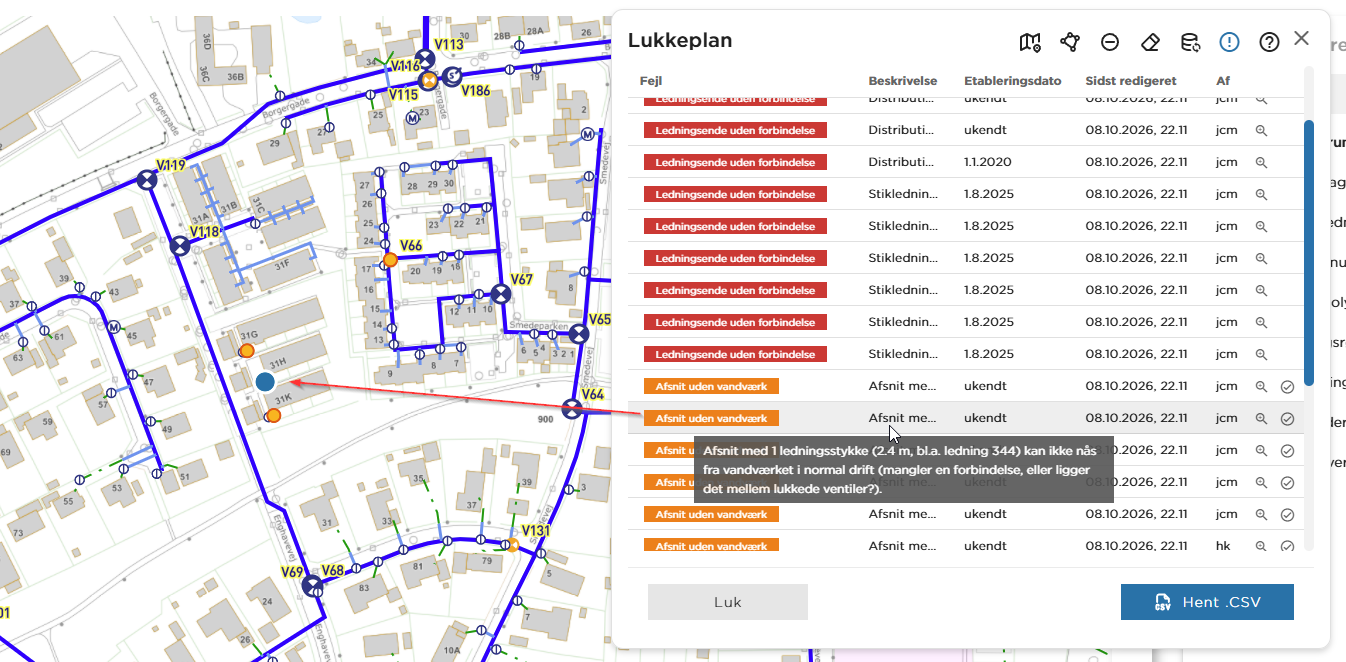
Brug værktøjet LukkeplanV2 i MapView
Lukkeplan finder de adresser, der bliver berørt, når forsyningen lukker for vandet eller varmen – ved et akut brud eller en planlagt reparation. Du finder værktøjet i værktøjslinjen øverst. Det ligner en dryppende vandhane.
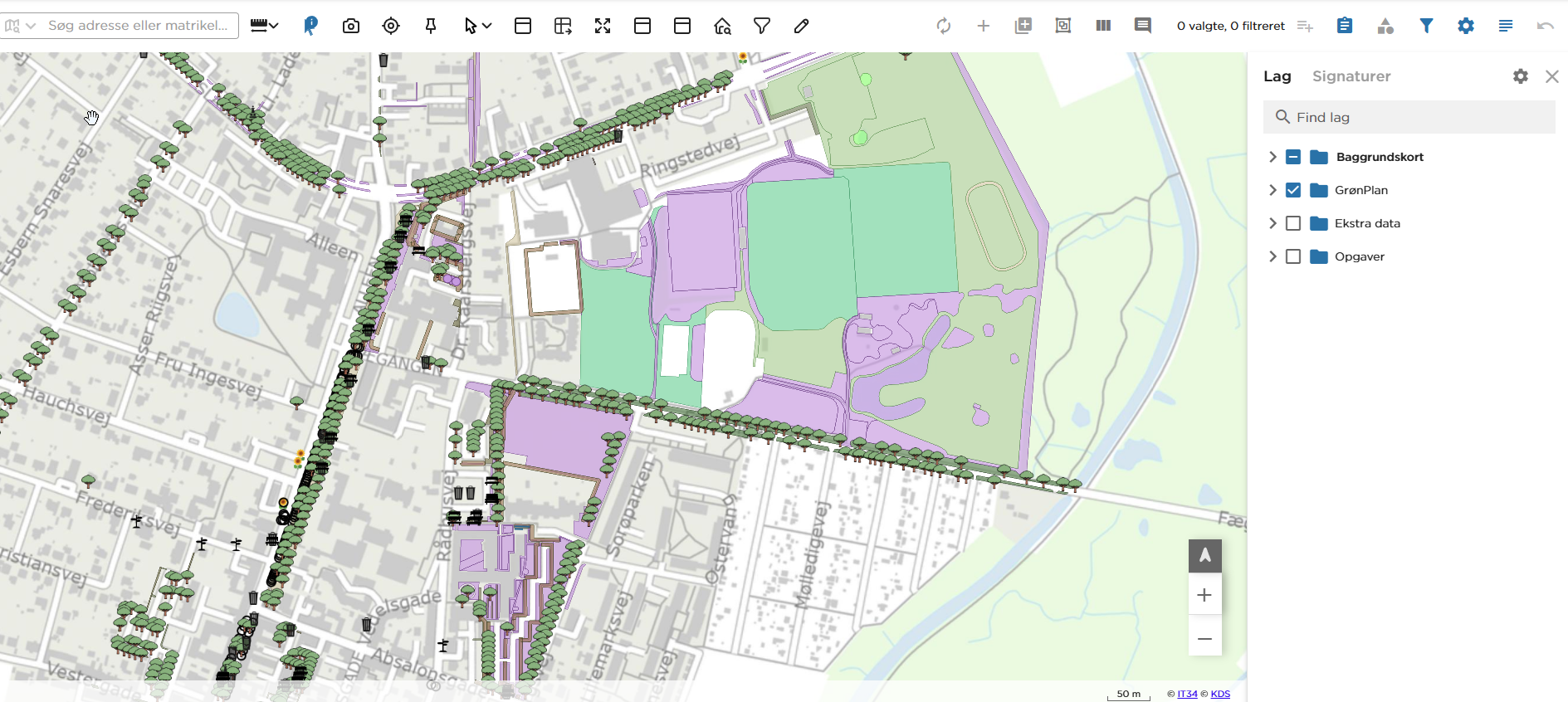
Med digitaliseringsværktøjet opretter og retter du de objekter, der gemmes i projektets datamodel – for eksempel græsflader, bede, hække, træer og belægninger. Det er noget andet end DrawTool, som kun laver midlertidige optegninger i kortet.
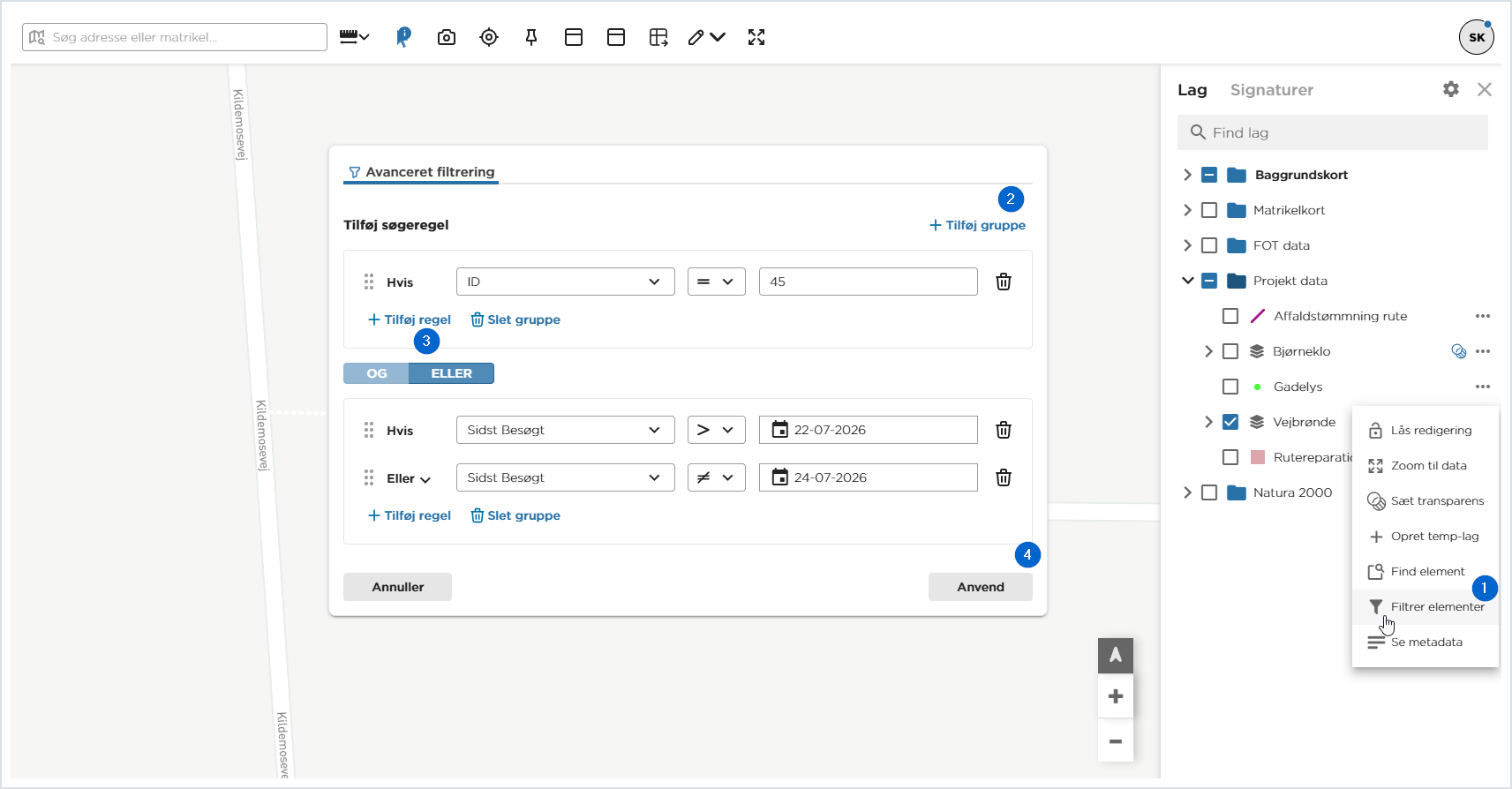
Sådan vælger, finder og filtrerer du data i MapView
MapView har flere steder, hvor du kan søge i data og skære dem til. Denne vejledning er overblikket: hvilket værktøj løser hvilken opgave, hvordan du kommer fra den enkle søgning til det sammensatte filter, og hvordan du rydder op bagefter.
De enkelte værktøjer i værktøjslinjen er gennemgået trin for trin i vejledningen til værktøjslinjen. Her ser vi på, hvornår du vælger hvad.